
Why Bootstrap Is the Secret Weapon for SaaS Prototyping
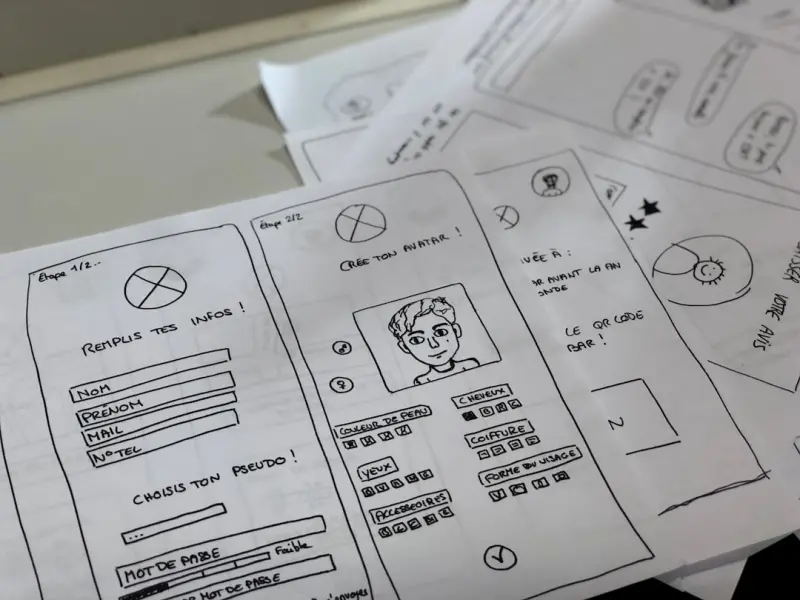
When a product team needs to move from a sketch on a whiteboard to a clickable, data‑driven prototype, the clock starts ticking. Stakeholders demand visual fidelity, developers want reusable code, and designers need a palette that can adapt to brand guidelines without a rewrite. Enter Bootstrap – the open‑source UI framework that has quietly become the backbone of rapid SaaS prototyping. While many associate Bootstrap with generic “bootstrap‑the‑web” tutorials, its modern utility‑first API, deep theming capabilities, and ecosystem of plugins make it a strategic asset for any B2B SaaS team that values speed without sacrificing quality.
The Evolution From “Just a Grid” to a Full‑Featured Prototyping Kit
Bootstrap began as a simple grid system, but it has morphed into a comprehensive suite that includes form controls, modal dialogs, toast notifications, and a robust JavaScript plugin architecture. The framework now ships with CSS variables that expose colors, spacings, and breakpoints directly to the developer, allowing for on‑the‑fly adjustments that were once only possible in a design system tool. This shift means you can generate a high‑fidelity prototype that looks and behaves like the final product, all while staying within the same codebase you’ll ship to production.
Utility‑First Meets Component‑Driven Development
One of the biggest pain points in SaaS UI work is the tension between utility classes (e.g., .mt-3, .text-center) and custom, reusable components. Bootstrap 5 introduced the utility API, which lets you generate an almost infinite set of utility classes from a single configuration file. This empowers design‑ops teams to create a library of brand‑aligned utilities that developers can drop into markup without fighting over specificity. When combined with a component‑driven workflow—where a button, card, or table lives as a single, testable module—you get the best of both worlds: speed of utility classes and reliability of components.
Brand Consistency Without the Overhead
In the SaaS world, brand consistency is a non‑negotiable. Every dashboard, marketing page, and embedded widget must echo the same visual language. Bootstrap’s theming system uses $primary, $secondary, and a set of $theme-colors that can be overridden in a _variables.scss file or, for even more dynamism, via CSS custom properties. This means your design team can define a single source of truth for brand colors, typography, and spacing, and the entire UI will reflect those changes instantly. No more hunting for hard‑coded hex values in dozens of component files.
Accelerating Feedback Loops With Live Theming
Rapid prototyping isn’t just about building fast—it’s about iterating fast. By leveraging Bootstrap’s CSS variables, product managers can toggle a data-theme attribute on the <html> element and instantly see how a new color palette or spacing scale impacts the entire UI. This live‑theming capability shortens the feedback loop dramatically: designers present a new brand direction, stakeholders click “approve,” and developers push the change to staging without a single line of SCSS rewrite. The result is a more collaborative environment where design, product, and engineering speak the same language.
Responsive Prototypes That Scale With Real Data
Most SaaS products are data‑heavy, and prototypes that ignore real data quickly become unrealistic. Bootstrap’s responsive utilities—.d-none, .d-lg-block, .col-md-6, etc.—work seamlessly with modern JavaScript frameworks like React, Vue, or Svelte. By wiring these utilities into a mock API layer, you can simulate pagination, loading states, and error handling that mirror production behavior. The prototype then becomes a living sandbox where product decisions are based on actual interaction patterns, not static mockups.
Testing Prototypes as Production Code
When a prototype is built on top of Bootstrap, you inherit the same accessibility and cross‑browser support baked into the framework. This means you can run the same suite of unit, integration, and visual regression tests on your prototype as you would on the final product. The payoff is twofold: confidence that the design will work for all users, and a smoother handoff from design‑ops to engineering. For teams that have adopted a monorepo strategy, this approach dovetails perfectly with monorepo mastery, allowing shared UI components to live alongside business logic without duplication.
Bootstrap in a Micro‑Frontend Landscape
Many modern SaaS platforms are moving toward a micro‑frontend architecture, where independent teams own their slice of the UI. Bootstrap’s modular JavaScript plugins can be loaded on demand, reducing bundle size and preventing the dreaded “CSS cascade wars” that often plague micro‑frontend implementations. By establishing a shared Bootstrap configuration in a central ui-kit package, each team can consume the same base styles while still customizing components to their specific domain. This creates a harmonious visual experience across the entire platform without stifling team autonomy.
Design Ops: Scaling Prototyping Across Multiple Teams
Scaling rapid prototyping across a growing SaaS organization requires a disciplined Design Ops approach. Bootstrap serves as the lingua franca that bridges design, development, and product. By codifying design tokens into Bootstrap’s SCSS variables and exposing them via a style guide, you enable any team—whether they’re building a new analytics dashboard or a partner portal—to spin up a prototype in hours instead of days. The result is a unified design language that scales horizontally as the organization expands.
Performance Considerations and Best Practices
While Bootstrap is a powerful tool, it can be a double‑edged sword if not used thoughtfully. To keep prototypes lightweight:
- Tree‑shake your CSS. Import only the components you need, or use a custom build via the Bootstrap source.
- Leverage the utility API. Generate only the utilities you’ll actually use, avoiding the bloat of the full utility suite.
- Lazy‑load JavaScript plugins. Load modal or tooltip scripts only when the corresponding component appears on screen.
- Audit with Lighthouse. Ensure that your prototype meets performance budgets before promoting it to a staging environment.
By following these guidelines, you retain the speed benefits of Bootstrap while delivering a prototype that feels as performant as a production‑ready application.
Future‑Proofing Your Prototypes
Bootstrap’s roadmap includes deeper integration with CSS custom properties, a richer set of utility generators, and first‑class support for design token standards like design‑tokens.org. By aligning your prototyping workflow with these emerging standards today, you safeguard your work against future re‑architectures. Moreover, the framework’s commitment to accessibility means that as regulations evolve, your prototypes will already be on the right side of compliance.
Conclusion: From Sketch to Launch in Record Time
Bootstrap isn’t just a static framework; it’s a dynamic prototyping engine that empowers SaaS teams to turn ideas into interactive, brand‑consistent experiences at lightning speed. Its utility‑first API, robust theming system, and modular JavaScript plugins make it uniquely suited for the fast‑paced, data‑driven world of B2B SaaS. When you combine Bootstrap with a disciplined Design Ops practice, you create a feedback loop where design, product, and engineering move together, delivering value to customers faster than ever before.

Dale Peterson is a freelance writer with a passion for technology, travel, law and personal finance. With 10 years of experience crafting compelling and informative content, he's dedicated to delivering high-quality writing for Blogging Fusion that engages audiences and achieves specific goals.
Related Posts

Bootstrap Meets CSS‑in‑JS: A Pragmatic SaaS UI Blend
Learn how combining Bootstrap’s proven grid system with CSS‑in‑JS libraries creates a powerful... Read More

Bootstrap’s Quiet Revolution: From Grid to Design‑System Engine
Bootstrap can do more than just grids. Learn how to extract its design tokens, build reusable compon... Read More

Bootstrap Reimagined: Crafting a SaaS‑Ready Design System
A deep dive into modernizing Bootstrap for SaaS, covering utility‑first migration, design tokens, ... Read More
Top Posts
Unlocking the Power of WordPress Multisite for Scalable SaaS Solutions
Explore why WordPress Multisite offers a cost‑effective, secure, and performance‑optimized foundation for SaaS platforms, enabling rapid tenant onboarding, ...Read More

The Quiet Power of Multi‑Cloud Service Meshes
A service mesh provides a unified, zero‑trust network layer across providers, delivering consistent security, observability, and cost savings for multi‑clou...Read More

Managed WordPress Hosting: The Strategic Lever Every B2B SaaS Needs
Managed WordPress hosting removes operational friction, giving SaaS teams faster releases, stronger security, and predictable performance—all without sacrific...Read More

Beyond Performance: Managed WordPress Hosting as a Playground for Continuous Experimentation
Managed WordPress hosting isn’t just about uptime—it's a strategic sandbox that lets teams iterate fast, run feature flags safely, and scale globally while ...Read More
0 Comments
Post Comment
You will need to Login or Register to comment on this post!