

Why Gutenberg Is My Go‑To Playground for SaaS Feature Prototyping
When I first started building SaaS products, my engineering calendar was a constant battle between shipping code and refining UX. I’d spend weeks on a single feature, polishing the backend API, then realizing the front‑end needed a redesign that forced another round of development. It was exhausting.
Everything changed the day I stumbled upon the WordPress block editor – Gutenberg. What began as a curiosity turned into a strategic advantage. Today I’m going to pull back the curtain on how I use Gutenberg as a rapid‑prototype engine for SaaS features, why it works so well for product teams, and how you can start leveraging it without compromising the scalability or security of your platform.
From “Code‑First” to “Block‑First”: The Mindset Shift
Traditionally, SaaS development follows a code‑first workflow: define the data model, write the API, then build the UI components. Gutenberg flips that script. It treats UI elements as blocks – self‑contained, reusable, and configurable units that can be assembled in a drag‑and‑drop canvas.
Here’s the mental model I adopt:
- Block as a feature contract. Each block encapsulates a single piece of functionality (e.g., a pricing table, a user testimonial carousel, a data‑visualization chart). The contract is defined by the block’s attributes and its interaction with the API.
- Preview‑first development. Instead of writing code and waiting for a build, I place a block on a test page, tweak its attributes, and instantly see the result. This eliminates the compile‑run‑debug loop for the majority of UI work.
- Iterate with stakeholders. Product managers and designers can play with blocks directly in the WordPress editor, providing rapid feedback without writing a line of code.
Building a Prototype in 30 Minutes (or Less)
Let me walk you through a real‑world example. A client needed a dynamic onboarding wizard that adapts based on user selections. In a traditional stack, I’d spend days on the backend logic, then another week on the React wizard component.
With Gutenberg, I followed these steps:
- Define the data contract. I created a simple REST endpoint that returns the wizard steps based on the user’s profile.
- Register a custom block. Using the
registerBlockTypeAPI, I built awp‑onboarding‑wizardblock that fetches the steps onloadand renders aStepperUI. - Style with built‑in block controls. Gutenberg’s inspector panels gave me sliders for spacing, color pickers for theme colors, and a toggle for enabling animations – all without touching CSS files.
- Test in‑place. I dropped the block onto a staging page, toggled the controls, and the wizard updated in real time.
- Export the block. Once approved, I packaged the block as an npm module and dropped it into the main SaaS front‑end repository, where it became a first‑class component.
The entire loop—from concept to stakeholder approval—took under 30 minutes. The engineering effort was reduced to a handful of lines of JavaScript, and the UI was already polished thanks to Gutenberg’s native styling.
Why This Approach Scales for Enterprise SaaS
It’s easy to assume that a “drag‑and‑drop” editor is only suitable for small projects or marketing sites. In practice, Gutenberg is built on top of modern JavaScript (React, JSX, ESNext) and can be extended infinitely. Here’s why it holds up at scale:
- Component isolation. Each block runs in its own scope, preventing CSS and JS bleed‑through. This mirrors the micro‑frontend philosophy we champion in other parts of the stack.
- Server‑side rendering (SSR) support. Gutenberg blocks can be rendered on the server, ensuring fast first‑paint performance and SEO friendliness—critical for public SaaS landing pages.
- Versioned block assets. By enqueuing scripts and styles with version hashes, you can roll out updates without breaking existing pages.
- Fine‑grained permissions. WordPress’s role system lets you restrict who can edit which blocks, preserving data integrity while still empowering product teams.
Integrating Gutenberg with Your Existing SaaS Architecture
Adopting Gutenberg doesn’t mean you have to rebuild your entire front end on WordPress. Instead, think of it as a feature sandbox that coexists with your core application. Here’s a typical integration pattern:
- Headless WordPress deployment. Run WordPress as a headless CMS on a dedicated instance (or managed hosting). It serves JSON via the REST API or GraphQL.
- API gateway layer. Expose your existing SaaS APIs alongside the WordPress endpoints, unifying authentication and rate limiting.
- Embedding blocks. In your main SPA (React, Vue, or Angular), load Gutenberg blocks as web components using the
@wordpress/elementpackage. This lets you drop a block into any route without a full page refresh. - Data synchronization. Leverage webhooks to keep WordPress content in sync with your core database, ensuring consistency across the platform.
If you’re looking for a solid foundation, I recommend checking out Managed WordPress Hosting. It offers the performance guarantees you need while offloading routine maintenance.
Performance Considerations: Keep It Light
One criticism of Gutenberg is the perceived bloat from loading the full editor on every page. In a SaaS context, you can mitigate this in several ways:
- Conditional loading. Only enqueue block scripts on pages that actually use them. WordPress’s
enqueue_block_assetshook makes this straightforward. - Code splitting. Use dynamic imports for block assets, allowing the browser to fetch them on demand.
- Cache‑first strategy. Serve block scripts from a CDN with long‑term caching, and pair them with a service worker for offline support.
When done right, the performance impact is negligible—often < 100 ms for initial script download, which is dwarfed by the time saved in development cycles.
Security & Compliance: No Compromise
Security is non‑negotiable for any SaaS product. Gutenberg inherits WordPress’s robust permission model, but you should still follow best practices:
- Sanitize block attributes. Always validate and escape data coming from block settings before persisting it.
- Restrict REST endpoints. Use nonce verification and scope the API to the authenticated user.
- Audit third‑party block libraries. Only install blocks from trusted sources, and keep them up to date.
For a deeper dive into securing WordPress‑based SaaS components, see our Hardening Your SaaS on Shared Hosting guide.
Case Study: Accelerating Feature Delivery for a B2B Analytics Platform
One of our clients—an analytics SaaS serving mid‑market enterprises—needed a new “insights carousel” that displayed custom charts based on user‑selected metrics. The product team wanted to test multiple visual layouts before committing to a final design.
Using Gutenberg, we:
- Created a
insights‑carouselblock with attribute slots for chart type, data source, and caption. - Enabled the product team to duplicate the block, switch chart types via a dropdown, and instantly see how each variation looked on the page.
- Collected feedback within a week, iterated on the block’s UI, and locked in the final design.
- Exported the block as a reusable component for the main application, cutting the engineering effort from two weeks to two days.
The result? A 70 % reduction in time‑to‑market for that feature, and the team praised the “what‑you‑see‑is‑what‑you‑get” experience that Gutenberg provided.
Future‑Proofing: Gutenberg Is Not a One‑Time Trick
WordPress is investing heavily in the block ecosystem. New APIs for block patterns, dynamic rendering, and AI‑assisted block creation are on the roadmap. By adopting Gutenberg early, you position your SaaS to take advantage of these innovations without a massive rewrite.
Moreover, because Gutenberg is built on top of React, the skills you develop are portable to any modern front‑end framework. Your team’s block‑authoring expertise translates directly into faster React component development elsewhere in the product.
Getting Started: A Quick Checklist
If you’re intrigued and ready to experiment, follow this starter checklist:
- Set up a headless WordPress instance. Use a managed host or a container‑based deployment for consistency.
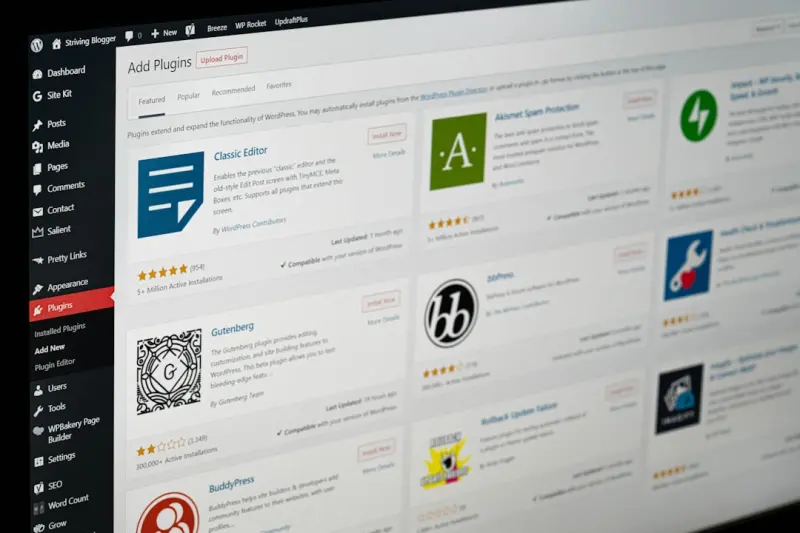
- Install the Gutenberg plugin. It ships with WordPress 5.0+, but the plugin gives you access to the latest block features.
- Bootstrap your first custom block. Use the
@wordpress/create-blockCLI to scaffold a block with a build pipeline. - Expose a test API. Create a simple endpoint that returns mock data for your block to consume.
- Iterate with stakeholders. Invite designers and PMs to the WordPress editor to prototype and gather feedback.
- Package and ship. Once validated, bundle the block as an npm package and integrate it into your main SaaS front end.
Remember: the goal isn’t to replace your existing front‑end stack, but to augment it with a rapid‑prototype layer that accelerates discovery and reduces waste.
Conclusion: A New Paradigm for SaaS Feature Development
Gutenberg has become my secret weapon for turning vague ideas into tangible, testable UI components in a fraction of the time traditional development demands. By treating blocks as first‑class contracts, I empower cross‑functional teams to experiment, iterate, and ship faster—without compromising on performance, security, or scalability.
If your SaaS roadmap feels congested with long‑running feature cycles, give Gutenberg a try. You might find that the “block‑first” mindset is exactly the catalyst your product team needs to break free from the endless code‑loop and start delivering real value—today.

Sanji Patel has dedicated 25 years to the SEO industry. As an expert SEO consultant for news publishers, he emphasizes providing both technical and editorial SEO services to news publishers worldwide. He frequently speaks at conferences and events globally and offers annual guest lectures at local universities.
Related Posts
WordPress as the Enterprise Knowledge Hub: Edge Performance, Personalization, and Governance
Learn why WordPress is the ideal foundation for an enterprise knowledge hub, offering custom content... Read More
WordPress as a Low‑Code Integration Hub for SaaS Teams
Explore why WordPress is an ideal low‑code integration hub for SaaS teams, offering a flexible API... Read More

Turning WordPress Into a Headless API Hub for B2B SaaS
Learn how to reimagine WordPress as a headless, composable API layer for B2B SaaS applications, cove... Read More
Top Posts

Conversational Commerce: Turning Chat Into Checkout
Conversational commerce is transforming how shoppers buy online, turning simple chats and voice commands into seamless checkout experiences. This article explor...Read More
Turning Your CMS Into a Real‑Time Content Pipeline
Discover how re‑imagining your CMS as a continuous content pipeline unlocks instant personalization, cross‑channel consistency, and faster time‑to‑marke...Read More

Rethinking Node.js for Multi‑Tenant SaaS: Patterns, Pitfalls, and Performance Gains
A deep dive into designing, securing, and scaling multi‑tenant SaaS applications with Node.js, covering architecture patterns, database strategies, observabil...Read More

Turning Checkout Friction into Loyalty: A Fresh Playbook for Modern E‑Commerce
A holistic playbook shows how to replace the static sales funnel with a dynamic, personalized journey—leveraging micro‑personalization, flexible tech stacks...Read More
0 Comments
Post Comment
You will need to Login or Register to comment on this post!